
5 Feb 2026
Claris FileMaker MCP: Bridge Your Database to AI
Artificial intelligence has been reshaping how businesses interact with their data, but for many Claris FileMaker developers, integrating AI into existing solutions often felt like a distant goal. That changed with the introduction of Claris MCP, the Model Context Protocol, a tool that bridges the gap between your Claris FileMaker databases and AI assistants like Claude.
What Exactly Is This MCP Thing?
Think of Claris MCP as a translator. It allows AI assistants to understand and interact with your Claris FileMaker data and scripts without requiring you to build custom APIs or learn new programming languages. Built on the open Model Context Protocol standard from Anthropic, introduced in 2024, it provides a standardised way for applications to share context with large language models.
The beauty of this approach is that it works with your existing setup. Claris MCP is a cloud-hosted service that acts as an MCP server, bridging your Claris FileMaker Server and AI assistants. It connects to your database and exposes your data and business logic to AI clients. Because MCP is an open protocol there is no vendor lock-in, it handles most of the integration work for you, requires no local server deployment, and has no steep learning curve.
Setting Up Is Simpler Than You Might Expect
Getting started with Claris MCP requires a few prerequisites, but nothing that should catch experienced developers off guard:
FileMaker Server version 22.0.2.204 or later
A valid Claris ID with team manager status in Claris Studio
OData and the Data API enabled in your FileMaker Server Admin Console
A dedicated FileMaker account with fmrest and fmodata extended privileges
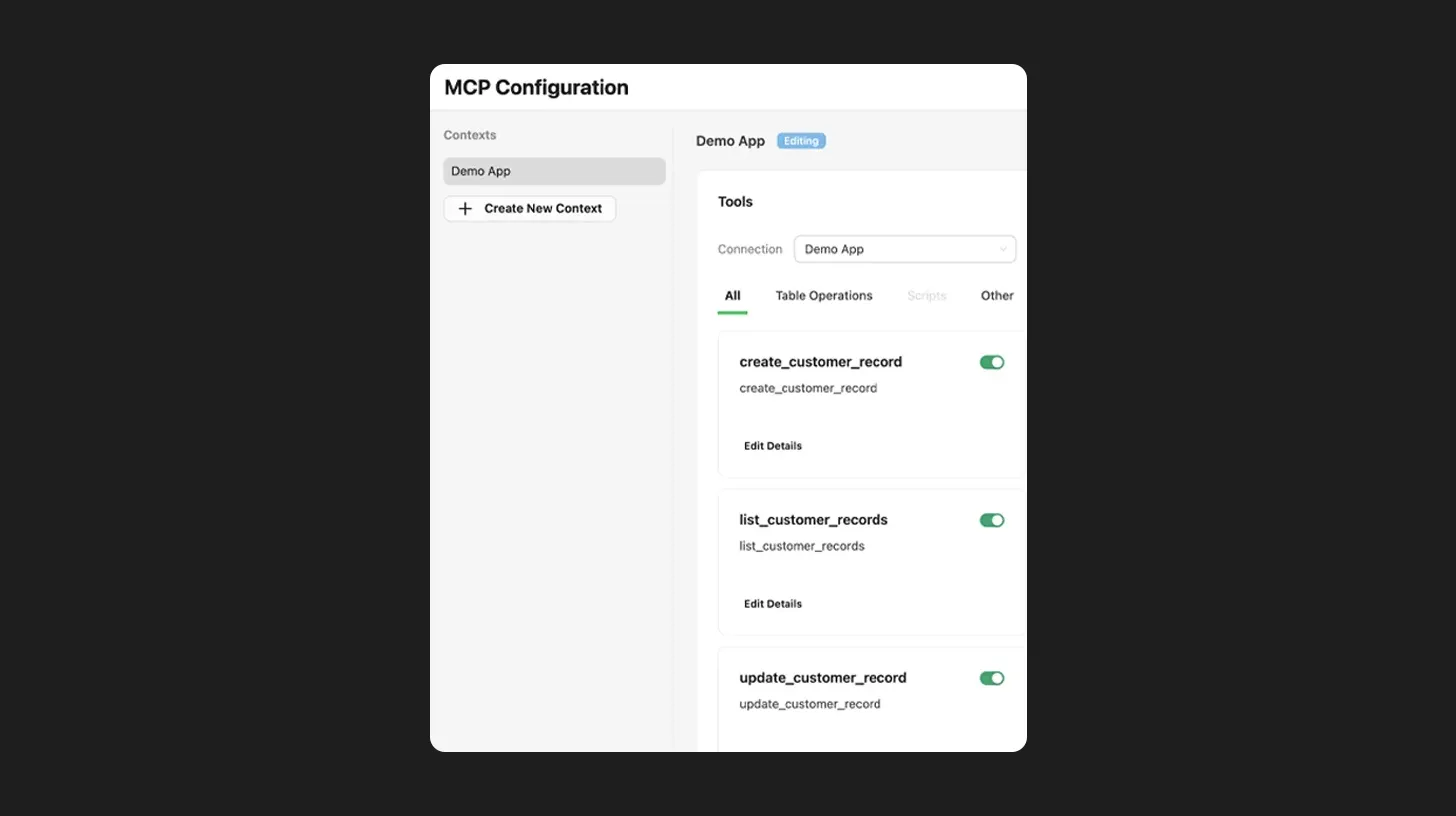
Once these are in place, configuration happens through the Claris AI Workspace console. You create a context, add a connection to your database, and select which tables and scripts to expose. From there, Claris MCP automatically generates a library of tools reflecting your schema.
The Tools That Make It Work
When you connect your database, Claris MCP creates several types of tools automatically:
Several data tools for each table, covering operations like get definition, create, search, list, update, and delete
Script tools that expose your existing FileMaker scripts as AI-accessible functions
Container field tools for uploading files and retrieving download links, generated for tables with container fields where there is a supporting layout
The clever bit is how the AI uses these tools. You can customise names and descriptions for each one, helping the AI understand when to use them. For instance, a script description like "Marks an invoice as paid and sends a confirmation email" tells the AI exactly what that tool accomplishes. This means your existing business logic and workflows remain intact, the AI simply becomes another way to interact with them.
Real World Applications Worth Considering
The practical applications are genuinely interesting. Imagine asking your AI assistant to show all pending orders older than two weeks, mark them as high priority, and notify the warehouse team. The AI would query your data, let you confirm the criteria, update the relevant records, and trigger your notification script, all through natural conversation.
Project management scenarios work equally well. A request like "Which tasks are overdue? Generate a status report and push their due dates out by one week" becomes achievable without touching your keyboard.
Security Stays Where It Should
If you are already using Claris FileMaker's security features, you will be pleased to know that MCP respects them completely. Access is granted through FileMaker accounts, meaning the AI can only interact with tables and fields that account has permission to access. Granular permissions let you control exactly which tables, scripts, and operations the AI can use. The AI interacts only through mediated, auditable requests rather than direct database access, and FileMaker Server logging tracks all AI-driven actions for transparency.
Looking Ahead
Claris MCP represents a significant step forward in making AI integration accessible to Claris FileMaker developers. The protocol supports multiple AI clients, meaning your investment adapts as new tools emerge. For teams already running FileMaker Server version 22.0.2.204 or later, the barrier to entry is refreshingly low.
It is worth noting that Claris MCP is accessible in most regions globally during this initial release phase, though only the North America region is formally supported. Expanded regional support is expected to follow.
Whether you are looking to streamline data entry, automate routine queries, or enable conversational access to your business data, Claris MCP offers a practical path forward without requiring you to rebuild what already works.
Latest Blog
Stay up to Date with the Latest News